Tech Word

  • Subscribe to our RSS feed.
  • Twitter
  • StumbleUpon
  • Reddit
  • Facebook
  • Digg

Monday, 27 December 2010

A primer on primers

Posted on 09:19 by Unknown
A primer (rhymes with dinner) is subset of information included in an encrypted message. The recipient of the message uses the primer to decode the message. In other words, the key to translating the message is contained within the message itself.

A spectacular example of a primer was presented in the film Contact. An extremely long and complex message written in a mysterious code is received from deep space. The scientists scramble to decode the message, but are unable to because they cannot correctly align the symbols at the edges of the thousands of pages contained in the message.

In this scene, three of the pages appear on a large monitor:


Someone discovers that the documents are actually three dimensional. By "folding over" the pages into each other to form a virtual cube, they magically line up, as shown here:

Not only that, within the edge of each page is the primer, the key to translating the message into Earthspeak, including the symbols for true and false:


Using the primer, the scientists are able to translate the message into a user guide that describes how to build an enormously complex machine.

* * *

All documentation contains primers to help the user understand the contents of the document.

Within traditional documentation, primers include:
  • a section explaining the contents of the guide and its audience 
  • a table of contents and index to guide the reader to the correct topic
  • standard document conventions describing how various items are presented in the guide, including: UI elements, paths, code samples, optional items, notes, warnings, and so on
  • instructions on how to view, search and annotate the document (if possible)
Through these items, the information required to understand the document is included in the document itself. It is the inclusion of this information within the larger document that enables this information to be a primer.

In additional to external primers (which are visible to the end user), you can also create internal (private) primers. These are elements which only you and the reviewers can see, and include:
  • questions and comments for reviewers, tagged so that a reviewer can quickly navigate to them
  • notes that apply only to the technical writer, for example, reminders of tasks the writer needs to complete
Again, the principle of the primer applies: information to help understand the message is included in the message itself.

These uses of a primer, effective as they are, are nowhere near as powerful as those in the next generation of documentation: XML. XML strips away all visual formatting in a document, replacing it with pure coded and tagged text. This allows you to easily add meta-information (in the form of additional tags) within the document itself.

An example of this is an XML Schema Guide, a highly technical document describing various programming objects, classes and variables that developers can use. It is possible to create a traditional document that describes these things. However, when the schema changes, for example, if an object is renamed or deleted, the writer must manually update the document.

To avoid this, writers and developers can work together to create a schema that is self-documenting. That is, within the schema itself are documentation tags. By updating the information within these tags, and then using an application to transform the schema into a document, the writer can create a schema guide that accurately documents the objects in the schema and displays the relationships between those objects through hyperlinks.

Another example is an installation guide for an application that can be installed under a wide variety of environments. Each portion of the guide that applies to a specific environmental scenario can be tagged accordingly, for example:
  • operating system: [Linux], [Unix], [Windows], [Mac]
  • database: [Oracle], [MS SQL]
  • collaborative software: [Sharepoint], [Groupware]

Using an online application, the end user selects their specific environmental combination then submits a request for the guide. A custom-built guide is then automatically assembled. For the writer, this means no longer having to maintain multiple versions of the guide or use complex "if/then" statements throughout the document (e.g. if you are using Windows, then..., if you are using Oracle, then...)

The message for decoding the guide is literally embedded within the guide itself - the purest form of a primer.
Read More
Posted in science | No comments

Tuesday, 21 December 2010

An obvious blog entry

Posted on 08:22 by Unknown
Here's an important formula to know regarding your personal finances:

Total household debt (mortgage, credit cards, student loans, etc.)
divided by:
Annual disposable income (your yearly gross income minus taxes)
equals:
The ratio of household debt to disposable income

Canada's average ratio of household debt to disposable income has now reached 148%, a staggering new record, higher than the U.S rate of 147%.

It means that, on average, Canadians owe about one and half times what they make after taxes. For example, someone who earns $50,000 would owe a whopping $74,000.

As many financial commentators have noted, the solution to this problem is rather simple:
Don't spend more than you make.
-or-
Don't spend money you don't have.

These principles seem obvious, but they are obviously not that obvious, as millions of people continue to ignore them to their peril.

Other obvious principles you know are:
  • If you eat alot, you will get fat.
  • Exercise is good for your body.
  • Drinking and driving is dangerous.
  • Dropping out of high school is dumb.
We know these things, but often act as though we don't.

In technical communication, there are also obvious principles we often forget:
  • Technical communication requires good communication and technical skills.
  • Resumes and cover letters are documents; it's therefore a good idea to make them good documents.
  • Typos are really bad.
  • The best way to learn a new tool is to use it.
  • You can learn about technical communication by talking with people who are actually technical communicators.
  • It's a good idea to write with the end user in mind. They are the people who will be reading what you've written.
Make a new year's resolution to think of more obvious things, then practise those things. Principles are nice, but useless if not acted upon - obviously.
Read More
Posted in finance | No comments

Tuesday, 7 December 2010

Help! My documents are leaking!

Posted on 10:27 by Unknown
The world has been gripped by one of the sexiest documentation events in history: the release of thousands of sensitive (and very embarrassing) diplomatic cables by WikiLeaks. If there was ever any doubt about the absolute power of information, it can be laid to rest now.

The "documentation manager" of this mess, Julian Assange, is now under arrest, not for leaking classified information, but for sex crimes. This is because sex crimes are sexier than informational crimes.

This event has graphically highlighted the two types of information that we deal with: internal and external. Any information developer who gets these mixed up will run into a world of pain. The problem is that because most information is stored in a "soft" format (on the computer or the web), it is easier than ever for private information to morph into public.

A fool learns from their own mistakes; a wise person learns from the mistakes of others. Let's learn from this and remember: any private information that you create can easily become public information. Thousands of examples of this happen every day including:
  • damaging emails accidentally sent to the wrong people, or deliberately forwarded to those people, or worst of all, made public (think Climategate)
  • error messages that were not properly reviewed and contain internal comments such as: tell the user not to be so dumb
  • any internal document leaked to the public
Therefore, any information you create or manage should include the following warning:

DANGER!
CONTENTS MAY EXPLODE OR LEAK.
HANDLE WITH EXTREME CAUTION!
Read More
Posted in politics | No comments

Thursday, 25 November 2010

Too many notes

Posted on 05:52 by Unknown
The spectacular 1984 film Amadeus about the life, music and madness of Mozart includes an amusing exchange between the Austrian Emperor Joseph II and Mozart. The Emperor, having just heard Mozart's opera, gives the following feedback:

"Your work is ingenious. It's quality work. And there are simply too many notes, that's all. Just cut a few and it will be perfect."

To which Mozart replies: "Which few did you have in mind, Majesty?"

The organizers of an electoral recall in British Columbia have run into a similar problem with a document. Elections Canada has rejected the application because it contains too many words.

Or does it? Chief electoral officer Craig James turned down the application because he felt that the acronyms MLA and HST are not two words, but eight. If you replace these acronyms with the words they represent (member of the legislative assembly, and harmonized sales tax) the 200-word maximum is then exceeded.

This is a documentation limitation that only a mindless bureaucrat could come up with. Even if you do count an acronym as more than one word (an obviously ridiculous standard), why would the maximum number of words in an application of this importance be set as low as 200? Surely one page (or about 450 words) would be a more reasonable limit?

In the meantime, the petition organizers need to find a good editor and give the following instructions:

"Note: There are too many notes in our note."
Read More
Posted in bad communication, entertainment, music | No comments

Wednesday, 17 November 2010

The Mother of all Confirmation Messages

Posted on 11:31 by Unknown
Most technical communicators who work in software will, at some point, be asked to write (or re-write) error and confirmation messages. This is often a very challenging but engaging activity. You have to consider the state of mind of the user who may be annoyed, upset or confused at seeing such a message. A well-written message, therefore, puts the user's mind at ease by explaining exactly what the problem is and how to resolve it.

Some examples of poorly written and well-written messages help illustrate this:

Poorly-written: Printing device out of media. (Error 34)

Well-written: Your printer is out of paper. Please add paper to the lower tray.

* * *

Poorly-written: Data type mismatch in field 23 - invalid alpha/digit entry. Message class AB43. [INTERNAL NOTE - TELL CUSTOMER HE SHOULD NOT BE SO *$*&%$ing STUPID!!! Homer Smith, Developer A41, Sector 7G]

Well-written message: You have entered numbers into the First Name field: please enter letters only.

* * *

Poorly-written: Illegal access attempt - type A342. DO NOT OVER-NEGATE  SUB-CONNECTION. MESSAGE TYPE - DFYWKJ3940983- FAILURE OVERRIDE. Please refer to subtype 5908DM4M67M4454 when quoting this message to your CIO-DM4 manager. (Form 12 is required, of course!) Have a day.

Well-written: You do not have permission to access the record. Please contact the Help desk.

You get the idea...

Recently, Google developed a message for anyone trying to import their Google Gmail contacts into Facebook. Google wanted to warn the user that they cannot export their contact information out of Facebook.

Here is the actual message users will see: (trust me, I am not making this up)
Hold on a second. Are you super sure you want to import your contact information for your friends into a service that won’t let you get it out?

Here’s the not-so-fine print. You have been directed to this page from a site that doesn’t allow you to re-export your data to other services, essentially locking up your contact data about your friends. So once you import your data there, you won’t be able to get it out. We think this is an important thing for you to know before you import your data there. Although we strongly disagree with this data protectionism, the choice is yours. Because, after all, you should have control over your data.

Of course, you are always free to download your contacts using the export feature in Google Contacts.

This public service announcement is brought to you on behalf of your friends in Google Contacts.

__I want to be able to export my data from Facebook. Please register a complaint on my behalf over data protectionism. (Google will not pass on your name or email address.)

__I still want to proceed with exporting this data. I recognize that I won’t be able to export it back out.

[Select one or more options.] [Cancel and go back]

Oh. My. God. Could Google have used more words? This is a terrible message which sends a terrible message. Because of the obvious conflict-of-interest, Google is doing everything it can to scare the user into not proceeding.

It is also ridiculous (not to mention very confusing) to have one of the options be to "register a complaint on my behalf", which is totally irrelevant to what the user's intention was. It would be like a Print dialog with the following options:

[Print the document]

[Do not print the document. I do not want to wilfully participate in the destruction of trees. Please automatically email all my contacts to let them know how much I love this planet.]

Even if you think Google should offer some sort of warning, it could have been done much simpler, like this:
Export my Gmail contact information into Facebook? (Note that you cannot export your contact information out of Facebook.)

[Yes] [No]

Software messages must be non-political, non-religious and uncontroversial.

I am "super sure" of that.
Read More
Posted in bad communication, Google | No comments

Tuesday, 16 November 2010

The Medium is The Messenger

Posted on 11:14 by Unknown
Kudos to Kik Messenger, a new messaging app for smartphones, with a twist. It tells the user when a message has been sent, delivered, read, and even when the other user is responding. In doing so, it converts regular text messaging into real-time conversations.

It runs on all types of smartphones: Blackberry, iPhone, iPad and Android.

And it's free.

(No - I have not been paid by Kik to say this - I own a dumbphone, not a smartphone.)

The technology behind this app is not new: it's similar to Blackberry's messaging software. However, not everyone owns a Blackberry - something Kik's creators realized and took advantage of.

These new messaging apps are excellent examples of what I call meta-info apps. Meta-info is information about information. Sending a piece of information (such as a text) is one thing; getting information about that information's delivery, reception, content and response is quite another. It adds a whole new layer of complexity and value to the original information.

In this case, the original information we are dealing with is quite simple: a text message. But what would happen if you applied meta-info technology to a user guide?

The result could be an online user guide with meta-info that could be visible to the author or the public such as:
  • the number of people who have read (or are currently reading) a particular topic
  • the search terms the user entered to find a topic
  • how much time the user spends reading a topic
  • a ranking of the quality of a topic; that is, whether the topic was useful
  • notes or comments from readers about a topic
  • an overall rating of the entire guide and its ranking compared to other guides 
Can you even begin to imagine how valuable this information would be in helping to improve the contents of the guide?

Some of this feedback technology exists today, but most guides are still in the old flat, one-way format. A document is delivered to the user, and it's the last we see or hear of it. Documents using meta-info, or meta-documentation take information to the next level.

Meta-info is here to stay. Kik Messenger has been downloaded over two million times in the past three weeks.

How many users have "downloaded" your documents? The fact that most of us cannot answer this question raises many more questions.
Read More
Posted in technology | No comments

Wednesday, 10 November 2010

Jay Leno's User Guides

Posted on 06:48 by Unknown
Avid car collector Jay Leno has written a hilarious piece on car user manuals, observing how much they, and their readers, have changed over the years.

Earlier guides assumed the user actually knew how cars worked and could easily service them themselves. Today's guides assume (correctly) that the user knows next to nothing, except perhaps where to put the gas in.

Here are some of Leno's funnier examples:

A. Old guide: Removing the Cylinder Head: Obtain a block of wood approximately the size of the combustion chamber and place this under the valve heads on the number one cylinder. Press down on the valve collars and extract the split collars. Remove collars, valve springs and spring seats. Repeat for the remaining five cylinders. Valves are numbered and must be replaced in original location. Number one cylinder being at the rear, that is, the flywheel end.

New guide: Changing the battery: Battery disconnection, removal or replacement should only be carried out by qualified personnel. Consult your dealer.

B. Old guide: In the event you need to remove the engine, gearbox and clutch, in the event it is necessary to carry out a repair of all the above units, notice that the gearbox may be removed from the engine when the floorboards have been removed and the rear of the engine has been supported. Removal of the gearbox will give access to the clutch.

New guide: If engine warning light goes on, consult your dealer. 

C. Old guide: To raise the headlamp beam, rotate spring-loaded screw on top of lamp clockwise. To lower beam, turn counter-clockwise. To adjust headlamp beam left or right, slacken the two hexagon-headed screws, one on each side of reflector rib assembly, and move the reflector assembly to the desired position. 

New guide: Do not attempt to adjust headlights. See your dealer.

Some other notes from old guides include:
  • An explanation of the correct "ignition point settings", showing how to "adjust the distributor and vacuum brake". The guide states: Your Ford dealer can make this adjustment for you, but there's no reason you can't do it yourself. Right, and while your at it, you can be servicing your washer and drier.
  • A guide for an old car made partly of wood states: If flames start licking over the front of the hood, shut off fuel and increase speed until flames blow out. Yikes - talk about a "hot rod".
  • This one is simple and to the point: After 1,000 miles, disassemble engine, check everything, reassemble. Got it!
All this shows there's only two things that affect the content of a guide:
  • the product being document
  • the user reading the document
They just don't make users like they used too...
Read More
Posted in bad communication, entertainment | No comments

Friday, 5 November 2010

Black Box In The Cloud

Posted on 14:09 by Unknown
A black box is any device or system that receives input, processes it, and produces output, in a way that is mysterious and incomprehensible to the user. The user does not know how it works, just that it works.

A black box can be summed up as:

Input -> [Black box] - > Output

Examples of black boxes abound: cars, TVs, cell phones, home appliances, computers, and so on. We don't know exactly how these things work, but simply take it for granted that they do.

Now, from the perspective of our employees and clients, a technical communicator is a black box, as follows:
  • Input: specification sheets, old documents, product reviews, emails, notes, assorted conversations, tall tales, rumours and innuendos 
  • Black box: the thoughts and actions of the technical communicator, and the tools used 
  • Output: technical documentation

A more common black box is the one on an aircraft. It is called, appropriately enough, a black box, although it is actually yellow to make it easier to find.

An aircraft's black box records its critical flight data, so that if the aircraft crashes, there's a record of events leading up to the crash. If the black box can be found, it can help crash investigators determine the cause of the accident.

The main flaw of this design is that someone actually has to find the black box. If there's no black box, you'll just have a black hole of data.

A Canadian company named Star Navigation Systems Group has developed a remarkable solution: a new black box. Instead of storing data within the box, the data is transmitted via satellite to a monitoring station.

It no longer matters if the black box is lost or destroyed, because the data is already "on the ground". More importantly, if there's a problem on the plane, an text alert is automatically sent to the appropriate people. This could be a life-saving alert, as it could allow technicians to solve a mechanical problem before it becomes a full-blown disaster.

Viraf Kapadia, the chief executive of Star Navigation Systems, explains it well:

"Say you're the vice-president of engineering for Air Canada and you're at an aviation show or conference. Something goes wrong with one of your aircraft of high priority, then you will receive an email on your computer with WiFi or your BlackBerry telling you exactly what is wrong in plain English.

"It is reactive versus proactive. The Black Box is very important when a plane goes down or a plane has had a problem and they want to do a postflight analysis, but that is always going to be after the fact. Our box is there watching in real time all the time so if there is an issue that needs to be addressed it can be immediately as opposed to t-minus one second which is then boom and crash."

To sum up: the two important things which distinguish the new black box from the old are:
  • the location of the information - the information is stored separately from the aircraft, instead of inside the aircraft
  • the timeliness of the information - the information is transmitted and reviewed in real time, as instead of after the fact
Traditional documentation suffers the same two drawbacks of the old black box: its location and timeliness. Most documentation is stored locally on the writer's computer. The writer can only review and update their documentation if they are physically at their computer.

In addition, most documentation is only updated when the product itself is updated and redistributed. Any important changes to a guide have to wait until the next release.

By contrast, a web-based content management system that regularly and automatically publishes its content online does not have these limitations. A writer simply logs in securely to the system no matter where they are located or even what computer they are using. Changes can be made anywhere and anytime. Content is regularly and automatically updated on a website that users can also access anywhere.

The end result is like the new black box: a system that can be accessed anywhere, and which distributes data immediately (or almost immediately).

Examples of these new information systems include web-based website and document management systems, such a Google Sites and Google Docs. However, any web-based tool that allows you to create, view, edit and manage information would qualify, including Twitter, Facebook, LinkedIn, and, of course, blogs. In fact, I have already updated this blog entry after posting it.

The old black box was in the clouds, literally.

The new black box, and, it is hoped, all important information, is no longer in the clouds, but on The Cloud.
Read More
Posted in cloud computing, technology | No comments

Thursday, 4 November 2010

You Lift Me Up

Posted on 07:23 by Unknown
The Marriott Marquis is one of the busiest hotels in New York, but it had a big problem. With so many visitors and guests, the wait for an elevator was painfully long.

To add more elevators would have been very expensive and messy, because the building itself would have to be ripped apart. So instead of adding elevators, Marriot made their elevators more intelligent by implementing a new elevator control system called destination dispatch.

Under this new system, instead of choosing your floor in the elevator, you enter your floor number outside the elevator using a keypad located in the elevator lobby. The display on the keypad then tells you which elevator to board, for example, Elevator A. As you step into the clearly labeled elevator, your destination floor number is displayed near the elevator to confirm your floor. You simply enter the elevator (which no longer needs its own floor buttons) and travel to your floor.

Before this system was introduced, the elevator control system did not know where people were going until after they boarded the elevator. Now, when passengers enter their floor number on the keypad before they board, the system uses totally different formulas to control which elevator should be used.

The system takes the information from each of the waiting passengers, and groups people together who are going to common destinations on the same car, minimizing the number of stops. This has reduced elevator travel times, and improved the capacity of the system by 30%.

The only downside to this system is that some people may feel they are losing control, because they are unable to select their floor once they have boarded the elevator. However, like with any new technology, it can take some getting used to, and the benefit of a faster ride clearly outweighs any old habits.

Destination dispatch is a marvelous example of using creative thinking to an age-old problem. However, it's more than that - it's actually an application of a basic information development principle to the physical world.

Before a user reaches their "final destination" in a document (the specific topic they are looking for), they will usually have been directed to it in one of three ways:
  • using a search function
  • using an index
  • using a table of contents
Each of these methods correspond to the destination keypad of the elevator system. The reader first enters or looks up where they want to go (the specific topic), and then actually go to that topic by following the resulting link.

A reader arriving at an incorrect topic is like the elevator user who enters an incorrect floor on the keypad. However, in the case of the keypad, it is user error. With the document, it is more likely the author's error.

This is why it is absolutely critical that the indices and tables of contents you develop are explicitly clear, otherwise they will send users to the wrong topics.

Who knew indices and tables of contents could be such a ride?
Read More
Posted in business, technology | No comments

Friday, 22 October 2010

My Quantum-Mechanical Resume

Posted on 13:38 by Unknown
This article is based on a presentation I gave at the STC Toronto Career Day on September 26, 2010.

Confessions of a Hypo-Professional
There's a special breed of professional that you'll sometimes encounter: the hypo-professional, hypo being short form for hypocritical.

Examples of hypo-professionals include:
  • doctors who smoke or are fat (or both)
  • lawyers who break the law
  • accountants who don't file their taxes
  • plumbers who don't "plumb" in their own homes
These are professionals who don't apply the tenets of their profession to themselves. As technical communicators, we'd like to think we're not included in this sorry group, but let's be honest. Are all of your personal user guides and other documentation organized into nice, neat little piles that you can easily access? Are all your computer files organized into logical folders? Do you back up your files on a regular basis? Have you documented all your important personal information and kept it in a safe place?

Of course, most of our personal docs don't matter very much when job hunting. No one will decide not to hire you because you can't quickly locate your Blu-ray player user manual. However, there is one personal document that is very important, and that is your resume. It is the most important document you will ever work on. You are a technical communicator; your document is a form of technical communication; therefore the resume, being a document, represents you. If it is not the absolute best it can be, you are limiting yourself and your career.

Resume Length - The Debate Rages
There's a long-standing debate about how long and detailed a resume should be. Many experts say that a resume should be as short and simple as possible, because most readers have little time to read it. Others argue a resume should be as detailed as possible to ensure that the reader will not have to guess or assume anything about you or your qualifications.

The Novice
This dilemma stems from the fact that there are different user types for your resume, as there are for all documentation. At one extreme, there is the novice user, typically an HR representative. This person often knows very little about our profession, and will look at your resume and ask:

"What is HTML?....And how do you spell HTML?"

For these simple folk, your resume should be as simple and brief as possible. This means a length of one or two pages, and using simple, plain language that anyone can understand.

The Über Writer
The other extreme type of resume reader is the very experienced technical communicator, whom I call The Über Writer. This is someone who will look at your resume and say:

"I see from your resume that you used FrameMaker. I am currently an ultra-secret beta tester for FrameMaker version gamma-Z-theta. It is able to export multi-dimensional PDFs into hyperbolic space. Your opinion of this please...in 27 words or less."

This type of user demands far more detail than The Simple User. They may require a resume of three or more pages, filled with the technical details they crave.

Doubling Up
These very different users mean that you need to have two versions of your resume: a simple, brief one and a longer, more detailed one.

You send the simple one to the novice user, and the complex one to the experienced user.

Makes sense, right?

Well, not necessarily.

It could be that the person you thought was a simple user actually knows more about technical communication than you realized. Or perhaps they don't know, but they may know someone who does, and they may have forwarded your simple resume to this experienced user.

Conversely, perhaps the experienced user doesn't have time to read your detailed resume. Or maybe they want to forward your resume to someone who is less experienced. Again, there is a mismatch between the user and the document type.

Broken Attachments
One solution would simply be to attach both versions of your resume in an email. However, this method also has problems. Some users may get confused and not realize which document to open or save. They may end up only forwarding one of the documents. Many things can and will go wrong when sending multiple attachments.

What's needed is a different kind of document: one that gives the user a choice of version to read.

Note that what we are doing here is what our profession entails: defining a documentation problem and then solving it.

The Wonderful World of Quantum Mechanics
The solution involves a paradigm shift in how a document is viewed. The science that inspired the solution is quantum mechanics.

Quantum mechanics is a very strange area of physics. It's so obscure that even the scientists working in it have trouble understanding it.

Essentially, it says that we can never really know the exact location of a subatomic particle. The location is all based on probability or random chance.

It's interesting to note that Einstein did not like quantum mechanics; for him, it was just too "random". His famous quote "God does not play dice with the universe" neatly summarized his feelings.

Got random?
The fact is, though, that randomness is everywhere. Think of a light fixture or lamp anywhere in your home; one that you currently are not observing. The light may be on or off: you don't know; all you can do is assign a probability to either state.

Or think of a friend who may be in one of several emotional states: happy, sad, surprised, anxious, and so on. Unless you are observing your friend, you cannot know which state they are in; all you can do is estimate probabilities for each state.

The concept of applying probabilities to various states is ultimately the basis of the resume documentation solution.

The Solution - The Long and Short of It
Instead of having your short and long resume documents stored on your computer, imagine placing them both online and then cross-linking them to each other.

The short resume would include links (at the very bottom and top) to the longer resume. The longer resume, in turn, would have links to the short one. This way, the user has a clear choice of resume to read.

Maintaining your resumes this way means that if someone tells you they are reading your resume, you won't know which version, unless they've told you - all you can do estimate a probability. Even then, it doesn't really matter, for you know there is a 100% probability that they will select the version that they want.

This solution therefore allows your resume to exist in a quantum state: it's length randomly fluctuates depending on which version the user is reading.

This solution also borrows directly from one of the main tools in documentation: the hyperlink. An online help topic can include hyperlinks to other topics, allowing the user to explore the information in ever-greater detail. Using the same principle, your simple resume is linked to a more detailed version, allowing the reader to explore your experience in greater detail.

Get WIMPY
It goes without saying that your brief resume should be just that: brief. One way to ensure this is to count the number of words in your brief resume, and see if it exceeds a certain standard. However, this doesn't take into account the numbers of years you've worked in the field. A longer work experience could necessitate a longer resume, so we need a more meaningful measure for length.

The solution is to divide the number of words by the number of years you've worked in the field. For example, my brief resume has about 313 words, and I've worked in tech comm for 12 years. 313 words divided by 12 years = 26 words/year, which is quite brief. I call this number the Words Per Year factor, or WPY. You can remember it using the mnemonic: WimPY; may your brief resume be as "Wimpy" as possible.

Keeping It Simple
Another thing to remember regarding your brief resume is that it should be simple. In fact, all of your documentation should be as simple as possible, but no simpler.

What happens when the principle of simplicity is not followed? To give a graphical example, view the PowerPoint slide developed by General Stanley McChrystal, the US and NATO force commander.

This nightmare of a slide is completely incomprehensible - it is a spaghetti diagram of the worst kind.

Viewing this slide, we can safely say its developer is highly intelligent, incredibly methodical and totally insane. As the good General said: "'When we understand that slide, we'll have won the war," in other words, never, for no-one can comprehend it.

If I'd been asked to develop a PowerPoint slide that would describe how to win the war in Afghanistan, it would have the following text:
Winning the War in Afghanistan
We can win the war in Afghanistan.

To win the war in Afghanistan
  1. Find the enemy.
  2. Kill ‘em alot.

It may not be militarily accurate, but at least it's clear and comprehensible.


Making the Connections
There's another aspect of quantum mechanics that relates to resumes. It is this strange but true fact: if a particle is rotated, another corresponding particle will also rotate. Scientists have no idea why this happens; it's as though the two particles are somehow consciously linked in a wondrous two-way process.

You and your resume are similarly connected. It's obvious that as you change and gain experience, knowledge and skills, your resume will change to reflect this. But is the opposite true? That is, if your resume changes, will you change?

I believe you will. I've seen many people change after their resume has been properly reviewed and updated. People light up when many of their missing skills and accomplishments inadvertently omitted from their resume are finally included. These changes can give the person the confidence to apply for positions that they may previously not have. And if they land that new job, then they really have changed - all as a result of changing their resume.

Therefore, you and your resume are indeed inextricably linked, in the same way as the two particles; if one of these things changes, so does the other.

Here a link, there a link, everywhere a link, link
As demonstrated, linking is a common theme in this discussion. You are linked to your resume, and your resume itself is linked to another resume. As an online document, your resume is written in HTML, however the term HTML is actually a good example of meaningless information.

HTML is an acronym for Hyper Text Markup Language, a phrase that is utterly meaningless to most Internet users. From their perspective, HTML really stands for Helping To Make Links, which is exactly what an effective resume does. It not only links to another resume, it contains links to relevant websites (for example, to the companies you worked for, the schools you attended, and, of course, to the STC).

At a higher level, the resume is a link to you, and a link in the employer's mind from you to the job they're seeking to fill. It is, quite literally, The Missing Link.

Portability
Another advantage of an online resume is its portability; it's ability to be accessed anywhere and anytime.

Ideally, you should have your own website with a URL that is easy to remember, with a prominent link to your resume. No matter where you are, if you encounter someone who could potentially employ you (or who knows someone who could), you can simply give them your website address, and let them do the rest. In fact, if they have smart phone or PDA, they can view your resume immediately.

So if anyone asks me for my resume, I simply say, visit abrooke.net.

And view my portable, quantum-mechanical resume.
Read More
Posted in quantum theory, resumes, science | No comments

Information to die for

Posted on 10:31 by Unknown
Think informational design decisions aren't life and death? Think again.

As reported recently, poorly designed medicine labels are killing and maiming people. Two people died when they were accidentally administered potassium chloride (which is poisonous) instead of sodium chloride (which is not poisonous). This tragedy occurred because the vial labels for both these substances were very similar in design and appearance.

Neil MacKinnon, a pharmacy professor at Dalhousie University said it best: “If you ask any kind of front-line nurse or pharmacist, they would say ‘Gee, this isn’t rocket science, why can’t they make labelling clearer – put things in different size fonts, in different colours?’”

To which I would respond: Duh!

The current label for the potassium chloride looks like this:

Potassium Cholride
Concentrate USP

To avoid confusion, I would slightly redesign this label to read:

HEY YOU!!!
DON'T YOU KNOW THIS S--T IS POTASSIUM F---ING CHLORIDE!!?!!
IT WILL KILL WHOEVER YOU GIVE IT TO!!!
STOP NOW, YOU CRAZY MOTHERF----R!

Yes, it's crude, but so what?

If the bottle had had this label, there would be fewer dead people.
Read More
Posted in bad communication, medicine | No comments

Thursday, 14 October 2010

33

Posted on 07:53 by Unknown
It's a great day to be Chilean.

It's certainly true that the 33 miners rescued from the depths of the earth are heroes. Anyone who can survive over two months trapped in that pit of hell must be considered nothing less.

But as CBC's National Science Commentator Bob McDonald pointed out, the other heroes are the engineers who designed the miraculous escape capsule which pulled all the trapped men to safety, with no major problems, and ahead of schedule.

We are all engineers; engineers of communication.

May all your engineering projects end as beautifully as the one in Chile.
Read More
Posted in news | No comments

Monday, 11 October 2010

Information and Other Risky Business

Posted on 10:23 by Unknown
Those of you who perceive information management as a rather dry affair should examine the strange case of Gabriella Nagy.

Ms. Nagy had a cellphone plan with Rogers. Her husband subscribed to Rogers TV cable service, and decided to add Internet and home phone services. "No problem," said Rogers, who were only too happy to oblige. "In fact, we see that your wife already has a cellphone plan, so to save you money (and make things more efficient), we're going to bundle your cellphone, TV and cable services under one account, and send you one big, juicy consolidated bill!"

Some time later, the husband received the first invoice, which included a detailed listing of all his wife's calls. "That's strange," he noticed while perusing the listing, "there seems to be several rather long phone calls to one number." He called the number, and discovered, much to his dismay, that it belonged to a man who was having an affair with the husband's wife. (The man having the affair was also married.)

After discovering the affair, the husband promptly left his wife, who became so depressed that she lost her job. In May of 2010, she sued Rogers for $600,00 for breach of privacy, claiming that their invoicing process ruined her marriage and destroyed her life.

In informational design and management terms, this occurrence is sometimes referred to as an "oops".

It's hard to know where to begin with all this. On the one hand, Rogers could have taken more care to advise Nagy that her account was about to be consolidated with another, resulting in a shared bill. On the other hand, to blame a communications company for a failed marriage is quite a stretch. Where would the lawsuits end? What about someone who simply uses a cellphone to yell obscenities at another person? Is the cellphone company liable for providing the medium for the message?

This case is similar to one faced by an airline years ago. To promote business, the airline offered a "fly your spouse for free" program. Loving husbands could take their wives on dream vacations, at no extra cost for the second ticket.

The program was quite successful, and being good corporate citizens, the airlines sent thank you letters to all the couples who participated: letters that many of the wives would open (since it was addressed to them and their husband) and read, and who would then wonder aloud: "Gee, I don't remember flying recently with my husband." For it turns out that many husbands did not travel with their wives, but with other assorted female companions.

Oops.

Information development and delivery, much like life, is a balance between security and convenience. The moment you create information, you are also creating risk:
  • risk that the information is incorrect
  • risk that the user will not interpret the information correctly
  • risk that you are exposing the user to information that they should not be exposed to

However, should you decide not to include the information, you are taking another risk: that you have withheld information that the user really did require.

There is no school, no program, and no teacher who can instruct you on how to always strike the right balance. Each instance has to be judged on its merits. Whether Rogers or the wife acted immorally is irrelevant. The fact is they are now both embroiled in a costly and very public legal battle. Many other philandering cellphone users are now quite worried that they will be exposed.

When her family's accounts were bundled, a simple automated email sent to Ms. Nagy could have saved her (and Rogers) much grief:

Dear Ms. Nagy:

Please be advised that your household has requested additional services. These will be bundled under one invoice, which will include a detailed list of your calls. However, if you would like this list to be mailed separately to you, please call us within the next 7 business days so that we can update our mailing records.

(This should keep you out of trouble with your husband as you pursue your illicit affair with your hot lover, whom we have been tracking in real time. However, for a nominal "filtering fee" of only $499, we with withhold this information from your husband.)

Better still, there should have been an opt-in option to have her call details included in the master bill. If no action was taken, the call details list would continue to be sent to her directly.

Yes, Ms. Nagy is ultimately responsible for her downfall. However, Rogers and all those who create and disseminate information also have a responsibility to avoid informational disasters such as these by striking the right balance between disclosing and screening out sensitive information.
Read More
Posted in bad communication, business | No comments

Thursday, 16 September 2010

TFSA is a four letter word; Gmail is not

Posted on 08:15 by Unknown
And the winner of the "it seemed like a good idea at the time award" goes to...the Tax Free Savings Account, or TFSA.

The TFSA is a special type of savings account established by the Canadian government, and which came into effect in 2009. Individuals can contribute up to $5,000 per year, and the amount grows tax-free.

Sounds great, right?

Here's the problem: if you contribute $5,000 to your account, withdraw it, and then add it back later, you will get a stiff penalty.

That's right - even though the total balance in your account never exceeded the $5,000 maximum, you will still be penalized.

I know this because it happened to me, along with about 72,000 other taxpayers. (For full details, read my entry on TFSA overcontributions in Wikipedia.)

CRA later admitted the contribution limit rules were confusing, and has said they will allow taxpayers to appeal if they genuinely felt they were mistaken, and that they will review each situation on a case-by-case basis.

The problem was that the entire TFSA programme was inadvertently designed to cause confusion. In other words, failure was built into the system. How?

With many people using online banking, transferring money back and forth between accounts is extremely easy. I, like the 72,000 other hapless taxpayers, simply moved funds back and forth on a regular basis, hoping to get the higher interest rate of the TFSA account.

A warning in small print did appear on the banking website, stating not to exceed the TFSA contribution room. But all that indicated to me and the other users was to not exceed the annual limit. There was no warning indicating that the limit doesn't apply just to the balance but to the total amounts transferred within a year. That difference makes all the difference.

This confusion exposes problems both in usability and documentation. There are several ways it could have been avoided. In order of effectiveness, they are:

1. Clearer documentation should have given to everyone who signed up for a TFSA account. All financial institutions should have emailed, or better yet, phoned, every applicant and clearly explained the transfer limit rules. Even with this warning, though, many people would still have over-contributed. So we move on to the next solution: clearer on-screen warnings.

2. When transferring funds using online banking, a clear warning should have appeared stating that if you transfer more than $5,000 into your TFSA, you will be penalized even if your total TFSA balance is less than $5,000. But again, even with this warning, some people would still have over-contributed, so we move on to the proper solution.

3. The online banking system should have tracked all TFSA transfers and prohibited all transfers that exceeded the overall yearly limit. A message would appear indicating that the transfer would exceed the user's limit, and stating that if they still want to perform the transfer, they would have to phone it in.

This last solution is the only valid one, because it builds success into the system. It prohibits the user from making a really dumb decision, which is what all great software should do. (Of course, it wouldn't prevent overcontributions that occur from one bank to another, but it still would avoid much grief.)

Compare the poorly-designed TFSA with a Gmail's "forgotten attachment" feature. In Gmail, if you prepare an email with the phrase "I've attached", but forget to actually include the attachment, a message appears asking if you still want to send the email without an attachment. Brilliant.

Now, it is not a perfect feature. It won't work if you use the phrase "I attached" or "Check the attached file". Ideally, the feature should just search for the word "attach". But still, it's a fantastic feature because it attempts to build success into the application.

Building success into our documentation means doing everything we can to anticipate how a user will screw up using both the document and the application. It means creating VAD - Value Added Documentation.

VAD does not simply tell the user what they already know, but what they need to know.

For example, a user may want to send a letter to many different people. If the user doesn't know about the mail merge feature, they will insanely copy and paste all the letters.

Having an index entry of mail merge is useless, because if the user doesn't about this feature, they can't look it up! However, having these index entries could help:
  • distributing a letter to many recipients
  • letters, sending a letter to many recipients
  • mailing a letter to many recipients
  • mass mailings, sending
  • recipients, sending a letter to
  • same letter, sending to many recipients
  • sending a letter to many recipients
Yes, these are long index entries, but so what? A good index attempts to anticipate all the strange and wonderful ways a user might look up a topic.

The mail merge topic itself has to clearly explain why doing a mail merge is better than copying and pasting, because if the user cannot see the benefit of what you are suggesting, they won't do it.

Bottom line - when it comes to bad documentation, don't get mad - get VAD.
Read More
Posted in bad communication, finance | No comments

Thursday, 2 September 2010

A Magically Magical Product that's Full of Magical Magic!

Posted on 10:36 by Unknown
Apple's a funny entity, somewhere between a corporation and a religion. I'm not a "Mac" person per se, but concede their products are among the few that actual make the news. Other companies would kill to such have constant free publicity. Can you imagine if Chrysler's latest attempt to build a car actually made headlines? It'll be a cold day at the North Pole before that happens.

I also appreciate the beauty, elegance, and extreme usability of their products. My first computer, in fact, was an Apple - an Apple IIc laptop, way back in 1985 - I don't think they even had cars back then.

What a dog the IIc was. It came with a small 9" ugly puke green monochrome screen and had no hard drive - just a built-in 5 1/4 floppy drive. You had to load the software from the floppy each time. The size of the documents was limited to about 9 pages. Still, it was miles ahead of my old typewriter, and did get me through college.

How times have changed. Apple's more recent devices are impressive, from the all-in-one desktops, to their phones, and most recently, the iPad.

I've played around a bit with the iPad and have to admit it's pretty cool. However, I don't like the fact that, unlike a notebook (or smaller netbook), it lays flat; that is, the virtual keyboard is embedded into the screen in one piece, meaning you can't fold it. It's just not ergonomic for me - I like to have the keyboard separate from the monitor and at a right angle to it. But that's just me; millions of other users don't care, as they have actually bought the thing.

Two of the new owners are my parents, who are Mac people. They recently bought an iPad, and asked their techie son to help set it up. I slowly undid the wrapping and beheld its awesome beauty and simplicity. I turn it on, expecting to see the standard desktop I had seen in the store, but instead a most unusual thing appeared - an image of a USB plug and then the word "iTunes".

Huh?

I quickly deduced that the setup procedure involved connecting iPad to the computer, and then opening iTunes. What a waste of good monitor space. Instead of displaying an image and just one word, the iPad startup screen should have given clear instructions:
  1. Connect your iPad to your Apple computer.
  2. Open iTunes.
  3. Follow the setup instructions from the iPad menu in iTunes.

I'm not exactly sure why the iPad doesn't have a separate setup and configuration application, but I guess it's because since iTunes and iPad start with the same letter, Apple felt they should live together.

I proceeded to run an update program to ensure I had the latest version of the "magic". It failed. I tried it again and again it failed. I was taken to a troubleshooting page which listed various solutions, some simple and some about as simple as Japanese mathematics. I thought Apple devices were supposed to make things easier; I certainly wasn't feeling the magic.

Anyway, by a miracle, I was able to restore the iPad to its factory state. I set up a WiFi connection; it worked, but it was so s-l-o-w.

I told my folks to call their "Mac" guy to figure it out.

Apple lovers - I hate those guys....
Read More
Posted in bad communication, technology | No comments

Tuesday, 31 August 2010

TWW - Live and In Concert!

Posted on 06:31 by Unknown
A Tech Writer's World (TWW, a.k.a. me) will be live on stage, sort of.

I'll be the final speaker at the 2010 Toronto STC Career Day, to be held at Seneca@York.

Watch me demonstrate how a resume can be both short and long at the same time, by drawing from the mysterious world of quantum mechanics.

View my notes from this event.

Be there or be triangular!
Read More
Posted in career, resume | No comments

Friday, 23 July 2010

Censoring the census

Posted on 12:07 by Unknown
It's a slow month in politics when the current burning issue for the Canadian government is a form document that no-one enjoys completing.

The government is in trouble because of their plans to scrap the mandatory 40-page long version of the census. It would be replaced by a shorter, voluntary version. Opposition parties, statisticians, researchers, and other groups say this will result in unreliable data being collected.

The government argues it's wrong to threaten fines and jail time for failing to fill out the census, and that the long form was too intrusive, with too many personal questions.

The government has a point. Look at some of the information required in the long form census:
  • the languages you speak at home
  • your race, nationality, and religion
  • where you work and how get there
  • the language you use on the job
  • how much housework you do
  • how much time you spend playing with your kids or talking to your parents
  • whether you have trouble walking, climbing stairs, or bending
  • who pays the rent or mortgage
  • how many rooms and bathrooms in your home
  • whether your home has any "missing or loose floor tiles," "defective steps" or more major deficiencies like "defective plumbing"
Does the government really need all this information? Although it's important for governments to plan for the future, I doubt all these excessive, personal details are really required. But that's not my main complaint.

The real problem is that I don't see why this document (either the long or short version) is even needed.

The entire system of mailing out a paper document to millions of people, having them mail it back, then having thousands of workers manually place the completed forms into a machine that can read them is nonsense.

I'm not suggesting that all this information should just be entered online. Aside from the fact that this assumes everyone has Internet access, this would still be a flawed process because:
  • it requires people to complete a form, which introduces errors
  • the data is only entered every few years, meaning it is never up-to-date
The real solution would be to glean the information on a continual basis in real-time from existing government databases. Everyone in Canada already has an ID number: a SIN, or Social Insurance Number. This number already contains much information about you. The government could use this information on a continual basis, in both short and long term planning.

Such a system would actively pull the required information, without forcing citizens to enter it, and would always be current. Yes, it would be an invasion of privacy, but so is the census itself. If you're going to invade everyone's privacy, you might as well do it cheaply and efficiently.

If the government ever created a system, they would simply be following the best practices of modern information management systems. In these systems, manuals are not just issued every few months when there is a release. They are continually updated, regenerated and then posted online. This allows the end user to always have access to the most current version.

It's time to move all paper-based forms to the ash heap of history where they belong.

Census designers - I hate those guys...
Read More
Posted in news, politics | No comments

Tuesday, 20 July 2010

Must you be so....human?

Posted on 11:10 by Unknown
The winner of the technological quote of the year (so far) is:
Just don't hold it that way.

This was Steve Jobs' initial statement when confronted with reception problems of the iPhone 4. He was responding to the now infamous complaint that the signal strength dropped when the phone was held in a typical fashion.

For someone who has built an empire based on outstanding usability, it was an astonishingly stupid thing to say. Jobs was telling his users: we don't need to conform our products to you; instead, you need to confirm to our products. In other words: don't be human.

Jobs' arrogance is not surprising. His string of recent product successes went straight to his already super-sized head. The greatest danger of success is thinking you can do no wrong. After immense pressure, though, he finally relented, offering a free bumper case to fix the problem, and full refunds to users who wanted them.

The simple lesson is this: usability, that is, designing a product with the end user in mind, isn't just one thing - it's every thing. I continually see examples of poor documentation design where the user's needs were an afterthought, if they were a thought at all.

Here are some recent cases:
  • An investment company sent me some forms to sign. I dutifully signed and returned them all. Later, I received one of the forms back. It turns out that even though it had areas highlighted in yellow for me to sign, date and initial, it was my copy. The only thing indicating this were the tiny words in the bottom right corner stating: Copy 1, Client. Typically, when I receive client copies, they are visibly marked with a stamp or a post-it note, stating: CLIENT COPY - PLEASE RETAIN.
  • My credit card statement is a spectacular example of wasted space. Each 8 1/2 x 11 page lists only about 20 transactions, which take up about 20% of the page. The information on the remaining 80% (the payment portion, any special news or announcements, the total purchases and balance, and the interest) is unnecessarily duplicated on every page. And the legal information is duplicated on the back of each page! It's not uncommon for my statements to be five or more pages. This isn't just a waste of paper: it makes it harder for me to locate and review all the transactions, because I have so many pages to waft through. The information that only needs to appear once should only appear once. With the space gained, a five-page statement could be reduced to one or two pages. There should also be a line space separating each set of transactions by date, again to make it easier to read through them.
  • Our garbage pick-up schedule indicated that July 1, the Canada Day holiday, was a pick-up day. Chaos and confusion ruled on our streets. Some people thought this must be a misprint, and did not leave their garbage out. Others took a chance and did take out their garbage. It turns out it was a pickup day, to allow the workmen to enjoy a long weekend. A simple asterisked note on the calender would have avoided all this confusion, for example: Note: This is a collection day despite the official holiday.

Usability must permeate every of your work. It means doing things like:
  • creating TOCs that can quickly be glanced through to give an aerial view of the product
  • writing conceptual overviews that leave no doubt about what the object or item in question is, and which include real-world examples and analogies where possible
  • including overviews in tasks and then explaining the task in simple, easy-to-digest steps
  • avoiding long sentences and paragraphs
  • using fonts and page layouts that are clean, simple and readable
  • breaking up large blocks of text with headings
  • creating indices that anticipate all the different ways a user could look up a topic
Not doing these things results in unusable documentation. Our response cannot be:
Just don't read it that way.

Our response must be:
Just what is the way you read it?
Read More
Posted in bad communication, technology, usability | No comments

Tuesday, 29 June 2010

Join the Bloc!

Posted on 11:54 by Unknown
Good news: I survived the G20 riots. They happened near my former workplace in downtown Toronto; fortunately, our office had recently moved to the slightly more peaceful city of Markham. No one was surprised by the violence; it was all foreseen, based on the history of previous summits. Remember the "Battle in Seattle" in 1999? It'll be difficult to name this current event, as there are few words that rhyme nicely with Toronto. Perhaps "The Scenario in Ontario".

What exactly did the G20 summit produce? A non-binding document, in which, among other things, the various leaders pledge to reduce their outrageous spending. What happens to leaders who don't meet their deficit reduction targets? Well, the other leaders might stare really, really hard at them, call them names, and maybe even start turning the lights on and off. Oh boy - that'll scare them into fiscal responsibility.

Time for some post-mortem documentation analysis. The security costs alone for the summit were over a billion dollars. There are 10,500 words in the released communiqué. That works out to over $95,000 per word. However, the total cost is even higher when you factor:
  • transportation, food and housing for all 10,000 delegates
  • construction of all the venues, including the "fake lake"
  • the funky G20 logos and marketing
  • three slightly over-cooked police cars
  • damages to stores
  • lost business
  • court costs for the anarchists
When all these are added in, the cost per word easily exceeds $100,000, a handsome rate for any writer.

Here's a few other random thoughts from this event:

Don't want to be arrested? Read the manual!
Over 900 people were arrested during the summit - a new Toronto record - woo-hoo! Now, some of those arrested and detained were admittedly innocent; passers-by, onlookers and journalists. To avoid future errors, I recommend a Summit Safety Manual be issued to all residents of the next city fortunate enough to host the next G20 summit.

This manual will contain only one procedure:
Not Getting Arrested

If you do not wish to be unavoidably detained and arrested, and held for an unlimited number of hours without access to food, water and washroom facilities, please complete the following task:
  • Stay far away.

Sign, Sign, Everywhere A Sign
I enjoy reading the communication (a.k.a. signs) displayed by the protesters with such brilliant and pithy statements as:
  • Ban the G20!
  • Capitalism sucks!
  • Bury the bankers!
  • Nature doesn't do bailouts!
The problem is that unlike a well-written document, the signs don't tell the reader what to do. I therefore plan to show up at the next protest with the following sign:
  • Ensure your sign includes a clear, specific action for the reader!
Even if the signs had been clearer, as documents they are useless. The world leaders are the end users for these signs. Has there ever been an instance where these leaders have said: "Gee, this sign says 'Ban the G20'. I guess we'd better cancel the meeting." Clearly, the sign-writers have yet to learn the prime directive of technical communication: Know your audience.

A Paradox for Anarchists - Let's Get Organized!
To call the anarchists who destroyed property idiots would be an insult to idiots everywhere. These thugs have the intelligence of blank hard drive. Now, there's nothing wrong with a little bit of revolution now and then; many great nation-states were born from revolution. The difference, of course, is that these historical revolutionaries stood for something, whereas the anarchists stand for nothing, except, of course, more anarchy.

Technical communication is undergoing a revolution from:
  • traditional WYISWYG tools where the content and the design of information is done simultaneously, and the documents are typically stored locally and organized into chapters and books

to:
  • server-based XML tools where the author works only with segments of pure text (no formatting), which are classified based on their type and which are stored on a central server that many authors can access
This is a colossal change; I am therefore launching a new movement named after the infamous Black Bloc G20 anarchists - it will be called The Text Bloc.

Join us as we smash old (computer) windows and destroy the old outdated documentation ways!

Chant with me now the following statements:
  • Death to WYISWYG! (Or at least partial harm to it!)
  • Paper-based systems don't do bailouts (and they don't do many other things either!)
  • Hey Mr. C.E.O. - can you spell X.M.L?!
  • Information wants to be free! (But avoid anthropomorphization!)
Read More
Posted in bad communication, news, politics | No comments

Tuesday, 1 June 2010

The Thrill of "Top Kill"

Posted on 07:42 by Unknown
British Petroleum (BP), responsible for the worst oil spill in U.S. history, should be given an award. Not for their oil drilling abilities (which one could fairly say are a tad below par), but on their naming abilities.

Specifically, whoever coined the term top kill to describe their latest failed effort to plug the ruptured oil line is a genius. It beautifully and succinctly describes an incredibly complex process.

Technical communicators are often asked to name things, specifically fields and other elements in a user interface. Giving objects clear, simple and self-descriptive names is often quite a challenge.

As an example, several months ago I reviewed the interface of a file migration utility. This application migrates files of one type into another. The interface consists of just one large dialog box. The user enter various parameters, then clicks a button to start the process. The question is: what should the button label be?

Initially, this button was simply labeled Go, but that's not very self-descriptive, is it? Also, Go only has two letters, making the button rather small in stature. The label I suggested, and which was implemented, was: Start migration. It's not as sexy as Top Kill, but it does the job.
Read More
Posted in business, news, technology | No comments

Wednesday, 19 May 2010

Why info systems fail

Posted on 13:49 by Unknown
If you only have time to read one news article today, read this one from the Financial Post.

Don't leave IT to the techies - Three problems lead to system failures describes in sickening detail the amounts wasted on failed information systems, and the main causes of these failures.

An astounding 68% of information technologies projects fail. This costs the world economy about $6.2-trillion a year. That's about $200,000 a second; imagine all the tech writers you could buy with that.

Here is the most important line in this article: "...failure, in most cases, has little to do with the technology and everything to do with the business process."

Specifically, the three main causes of IT project failure are:
  • the project manager failing to understand the business requirements
  • the system's users not being involved in its design
  • senior management failing to get involved in the project
This is true of any IT project, including any documentation or content management system.

If the documentation manager does not understand the specific business requirements of the proposed system, it will fail.

If the information developers are not involved in choosing or designing a system, or if the system is too difficult to use, it will fail.

If senior management (which can include VPs, CFOs, CIOs or any other alphabet soup) does not support or get involved in the project, it will fail.

It's a cliché but it's true - people don't plan to fail, they fail to plan.

Finally, in the one minute it took you to read this blog entry, another $12 million was wasted...
Read More
Posted in bad communication, business, technology | No comments

Monday, 3 May 2010

The PowerPoint from Hell

Posted on 13:56 by Unknown
General Stanley McChrystal, head of U.S. and NATO forces in Afghanistan, has provided a perfect example of how not to create document: a PowerPoint slide that purports to explain the U.S. military strategy in Afghanistan.

Afghanistan "Explained"
“When we understand that slide, we’ll have won the war,” General McChrystal said. In other words, never. This image is the worst example in history of spaghetti documentation.

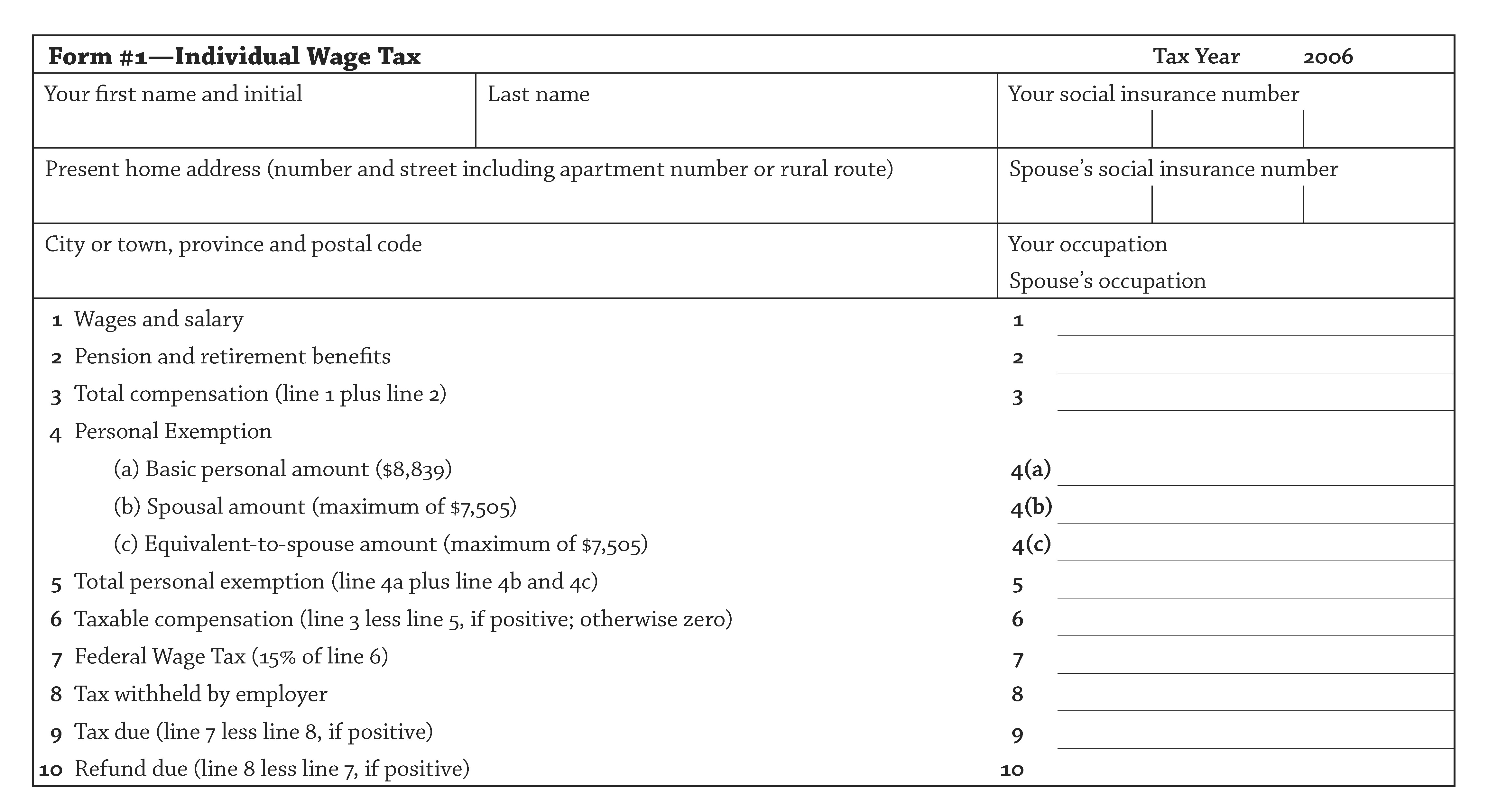
Now, compare that monstrosity with a simple document created internationally renowned tax expert Dr. Alvin Rabushka at Stanford University.

The Flat-Tax Postcard
Dr. Rabushka has proposed a 15% flat tax for Canada. This would collect the same amount of revenue that the government currently collects, without having to wade through multi-page, hyper-complicated tax form documents and software.

The good doctor even designed a form the size of a postcard that could be filled out in about five minutes.

It's estimated this simple document could save Canadians $30 billion when you factor in:
  • the time and effort spent getting receipts and preparing tax returns
  • the cost to hire accountants and lawyers to sort through the massive tax code
  • the cost to employ vast armies of tax collectors their support staff

I can think of no two documents with more different content and results.

The PowerPoint explains nothing, saves no money and may even indirectly contribute to the war's endless multi-billion dollar cost by giving the illusion of comprehension to an incomprehensible situation.

The tax form is clear, simple and explicit, and would save billions of dollars.

Which document would you prefer to manage?
Read More
Posted in bad communication, news, simplicity | No comments

A quick tip

Posted on 11:49 by Unknown
One can discover great technical communication in the unlikeliest of places.

Here's a sample from the bottom portion of a restaurant bill I came across recently:

Gratuity not included
Suggested tip at 15% - 2.10
Suggested tip at 18% - 2.52
Suggested tip at 20% - 2.80

Why oh why did someone not think of this sooner? My only quibble is that the terminology is inconsistent - the heading uses gratuity whereas the listed items use tip, but that's a minor point.

This document saves the user the grief of having to manually calculate the tip. It considers the needs of the user and immediately fulfills them, like any great document should.
Read More
Posted in business, usability | No comments

Wednesday, 28 April 2010

The Tech Writer vs. The Volcano

Posted on 08:47 by Unknown
After a week of chaos-inducing activity, the volcano in Iceland finally ran out steam, or in this case, lava and smoke. If a mountain could be arrested for causing a public disturbance, surely this one would qualify.

Fortunately in our profession, we don't have to battle lava and smoke. However, we often have to clean up a mess. As smoke and ash cloud the air making it hard to see what's out there, so do confusion, apathy and vagueness cloud up a document.

One of my company's current projects is to rewrite an enormous documentation set. Some of the guides are several years old, and it shows. The documents were not always maintained, fogging up the truth, and hiding the important facts users need to know.

I am not certain of what would be the easier task: fixing the doc set, or getting a volcano to stop exploding.

Time will decide.
Read More
Posted in nature, news | No comments

Wednesday, 21 April 2010

The Mother of all Engineering Feats

Posted on 13:26 by Unknown
British scientists were able to create human embryos with genetic material from one man and two women. The goal is to produce genetically altered "designer" babies and thereby eliminate hereditary diseases by combining the best bits of each person. It's a controversial idea, but if saves lives and improves health, I'm all for it. Plus, you'd get to tell all your friends you have three parents - how cool is that?

Just as people have genetic strengths and weaknesses, so do technical communicators have strengths and weaknesses in their profession. Strengths in technical communicators include:
  • being friendly and outgoing
  • able to work quietly in solitude
  • able to work with a wide variety of people
  • able to work with like-minded people
  • a solid language background
  • a solid technical background
  • excellent written communication skills
  • excellent oral communication skills
  • able to see "the big picture"
  • an eye for detail
  • able to work in chaos
  • are comfortable with routine
  • able to follow existing standards
  • able to create new standards
  • able to view information textually
  • able to view information graphically
  • valuing simplicity over complexity
  • valuing completeness over simplicity
  • enjoy starting new projects
  • enjoy updating existing projects
  • able to work well with WYISWYG tools
  • able to work well with non-WYISWYG tools
As should be obvious, no single technical writer could possibly have all these strengths, because many of them contradict each other. The best documentation teams, therefore, have a good mix of writers from a variety of backgrounds.

I was once asked in a job interview this intriguing question:
Who would make the better technical writer?
a) Someone who studied language and writing, and then later learned technical skills
or
b) Someone who studied technical information, and then later learned language and writing?

The short answer is - we can't know. The longer answer is: it depends what you mean by "better technical writer". Either person may match the requirements of a particular job, and it is impossible to know from these brief descriptions who is the more apt candidate.

For example, I remember looking through medical textbooks a few years ago. They contain detailed pictures of human anatomy. Only two types of technical communicators could have created these images:

a) a graphic artist who learned anatomy
or
b) a medical person who learned art

There is no way to tell by looking at the illustrations which of these two communicators were responsible.

You can never be all things to all companies. You cannot be "the perfect writer", however, you can be perfect for a particular job. You have a complex set of skills and traits - you "tech comm DNA". Know your DNA, and you will know where you should be and what should be doing.
Read More
Posted in science | No comments

Thursday, 15 April 2010

Inspired by truth

Posted on 13:42 by Unknown
Inspired by true events is a tag line appearing in some new films. This slogan replaced the previous antiquated version: Based on a true story. It is also complete nonsense, because all films, indeed all art, is "inspired" by true events, because all art is inspiration from actual life.

This is a classic example of marketers taking a perfectly good piece of text and ruining it with meaningless gray words so as not to offend anyone. I enjoy fictional works as much as anyone, but please don't mix my fact and fiction. I would rather see a documentary than an artistic film claiming to be "inspired by true events", because in a documentary, I'd assume everything I see actually happened. In the "inspired" film, I wouldn't be so sure.

There are writers, and then there are technical writers, and never the 'twain shall meet. Technical writing is as different from fictional writing as house painting is from artistic painting. Writing a novel does not qualify a person to be a technical writer. It only qualifies them to be a story-teller.

We don't tell stories. We don't spin yarns or tell tales. We explain the facts; the what, where, when, why and how. We don't get into feelings or characters. We remain cool and unemotional in our work. You may try to change us to novelists and ad men, but you will fail.

We are logical. We battle confusion and uncertainty.

We are Vulcan. We are the Borg.

Resistance is futile.
Read More
Posted in entertainment | No comments

Thursday, 8 April 2010

The Big Bang of Information

Posted on 09:18 by Unknown
Scientists are edging ever closer to discovering the deepest mysteries of the universe. The world's largest particle accelerator, a monster of a machine with a circumference of 27 km, is now online. Named the Large Hadron Collider, this machine is so big it occupies two countries: Switzerland and France.

This accelerator smashes sub-atomic particles into each another at speeds approaching that of light, creating collisions of almost 14 trillion electron volts. (Almost enough to power Windows 7.) In doing so, scientists hope to recreate the conditions that existed immediately after the Big Bang, when the universe exploded into existence.

One popular misconception about the Big Bang is that it was an explosion of matter into space. In fact, it was an explosion of space itself. That is, space itself expanded, and continues to expand, into nothing. Now, it's very hard to define nothing; one can only say it is the opposite of something.

There was some concern that the accelerator might actually create a black hole, and swallow up our galaxy. If that happens, I may have to suspend this blog for a while. Black holes notwithstanding, the Large Hadron Collider could prove the existence of the Higgs boson, also know as the "God particle." If this particle can be recreated, it would have enormous cosmological implications, because it would prove the Standard Model theory of the universe, a theory that explains how all matter and energy are connected.

So, we have never been as close to the Big Bang as we are now. However, space is not the only thing that's been exploding: so has information. There's probably more information produced today in one second than was produced in a hundred years just a few centuries ago. Think of all the places information exists:
  • the Internet
  • computers
  • bookstores
  • signs
  • stickers
  • personal letters and documents
  • companies
  • governments
  • that big mess in the back of your closet
Billions and billions of pages, and it keeps growing like a monster. Soon even the universe won't be big enough to hold it all.

Information has exploded as rapidly as the universe. But if the universe began as tiny particle, did all the world's information begin as one? And, if so, how could we represent that?

We could start with the word itself: information. But this word can be further compressed and expressed simply as the letter i, the international symbol for information. [i] signs are visible at airports and other public places. People intuitively know that [i] = information.

In addition, i has two parts: a short upward line with a small dot on top of it. The line is an arrow, directing you to a dot. The dot is the point, literally. If your document does not make the necessary points, it has no point, and it is not useful information, but dark matter.

All information, therefore, began from the lowly i.

The i tells all.

The i is infinite.

The i is the i-ching of our profession.
Read More
Posted in science | No comments

Wednesday, 7 April 2010

3D Documentation

Posted on 18:00 by Unknown
I recently experienced the latest technological marvel: 3D television, and have to admit - it is spectacular. The images have an incredible depth, and also can appear to "pop out" towards you, for a virtual virtual reality experience. But it ain't a cheap experience.

A 40" Samsung 3D TV currently sells for $2,500 CDN. The special glasses required sell for $250 a pair. For a typical family of four, that means an extra $1,000 just for the eyewear! And, you have to buy a new Blu-Ray player and new 3D Blu-Ray disks. And a new type of cable to connect it all. Didn't we just go from DVD to Blu-Ray? What's next? 4D TV?

To be fair, 3D TVs can also convert regular 2D images (regular TV channels and DVDs) to 3D, but the effect is not as great as with a true 3D source. If nothing else, 3D TV will drive down the price of regular HDTVs, which themselves are light years ahead of CRT TVs.

The price will have to drop considerably for this new technology to have any chance of succeeding. If it does, it is proof that people are willing to spend just to get an extra dimension. However, dimensions don't just apply to images: they also apply to information.

The dimension of information is its scope and quality. If the contents of a guide have a good dimension to them, it means they are in-depth, clear, detailed, meaningful and practical. If the contents lack dimension, then the guide is "flat". A flat guide explains only the basic facts of a product, and not their relevance or practical application. A flat guide does not add value; a dimensional guide is the essence of "value-added".

Adding dimension to a guide means including things such as:
  • clear explanations of all the concepts
  • a detailed glossary of all the terms; if a term is used in the definition of another term, it should be hyperlinked to its definition so the user can easily move from one term to the next
  • an explanation of exactly why a user would complete a task, before presenting the actual task steps; if the explanation itself raises another "why?", then it is not a true explanation
  • different ways to accomplish the same task
  • relevant cross-references to other topics (but not too many because then the user will be overwhelmed!)
  • detailed screenshots, with all of the elements clearly labeled
  • a rich index that anticipates all the ways a user might look up a topic
  • a feedback form where users can directly comment on the usefulness of a topic
Don't be flat. Take your docs into the next dimension. (No 3D glasses required.)
Read More
Posted in business, entertainment, technology | No comments

Wednesday, 31 March 2010

A healthy-sized document

Posted on 12:23 by Unknown
The Obama administration scored a major victory with the passage of its health care bill, a massive 2,000+ page document . I wonder if every Senator and Congressman has actually read the entire thing; a Quick Start Guide would be useful.

This bill sounds great in theory: millions of Americans who were not previously insured now will be. Insurance companies can no longer exclude people with pre-existing conditions, which from the horror stories I've heard could include symptoms such as "breathing" and "blinking". Time will tell, though, if this bill will actually save lives. However, a new television show offers an enlightening perspective.

Jamie Oliver is a English celebrity chef who advocates healthy eating. He's exposed and improved the quality of meals served in the English school system. In his latest show, Jamie Oliver's Food Revolution, he visits Huntington, West Virginia, ranked as one of the the least healthy cities in the U.S. He is shocked to discover the high-sugar and high-fat processed junk being fed to schoolchildren twice each day.

Two scenes from this show will be forever etched in my memory. One is an experiment with some of the schoolchildren that goes horribly wrong. Jamie brings several young children into his kitchen-storefront. He takes out a chicken and shows them the good cuts of meat from it - the breasts, the thighs, and so on. What remains is the disgusting garbage leftover - the bones, cartilage and fat. He places these horrid leftovers into a blender, liquifies them, and adds artificial flavours and fillers, makes them into patties and deep fries them, to demonstrate how chicken nuggets are actually made.

At this point, Jamie asks the children if they would like to eat these nuggets, fully expecting that none of them will. To his shock, the children ask to eat them! Why? Because they are hungry.

In an even more disturbing segment, Jamie visits a classroom. He discovers that the children cannot identify basic vegetables such as tomatoes, potatoes and cauliflower. They can identify ketchup, french fries and hamburgers but have no idea as to where these items come from. In a later follow-up visit, the children have learned to identify the vegetables, but I've no doubt that this ignorance is common throughout the country.

Returning to the health care bill - the problem is that this bill does not directly address what is really killing and maiming Americans by the millions: poor diet, lack of exercise, and mental health issues including addictions such as smoking and drinking. This bill treats the symptoms of poor health, not the major causes or reasons.

It's important to be aware of symptoms vs. underlying reasons in our profession. It's a common perception that the purpose of technical communication is to instruct users on how to use a product or service. Although this is true, it is not the true reason, for we can always ask: Why do companies care if their clients can use the product? They care because if users can't use the product, they will either return it or call tech support, both of which drain profits. However, even that is not the true reason.

For the true reason, we need to understand that all belief systems have definitions of good and evil. In the free-market capitalist system, the definitions are:
  • good – anything that increases profits
  • evil – anything that decreases profits
Now we have the real reason, and not the "symptom" behind the need for technical communication. It's not to tell users how to use products, or to lower support costs, even though both these things are important. It is to maximize profits.

This is also the true reason because we cannot effectively ask "Why do companies need to maximize profits?" They just do.

Remember this in an interview. Technical communicators already are a disadvantaged minority, because we are a cost centre and not a revenue generator. Therefore, in a interview, you must show how you increased profits by decreasing costs.

Be good; don't be evil.
Read More
Posted in business, news, politics | No comments
Newer Posts Older Posts Home
Subscribe to: Comments (Atom)

Popular Posts

  • Six Things That Should Be Single Sourced
    Single-sourcing, as we all know, is the art and science of using a single repository of information to produce multiple outputs. Typical ex...
  • Interviewing and Dating: A Single Source Solution
    Last month, people celebrated "Valentine's Day", a day to celebrate romance and love, a day to be extra-nice to your partner, ...
  • The Power of Words
    There's nothing like an election to illustrate how powerful words are. Politicians, pundits, and the media use words to advance their ca...
  • The Governing Dynamics of Documentation
    Game theory is a specialized field of mathematics that analyzes choices and results in strategic situations, or games , as the players try t...
  • Why info systems fail
    If you only have time to read one news article today, read this one from the Financial Post. Don't leave IT to the techies - Three probl...
  • How to update a document - NOT!
    Canadian International Co-operation Minister Bev Oda needs to work on her document management skills. She hand wrote the word 'NOT'...
  • Publishing for Pollard
    Most of you probably have never heard of Jonathan Pollard, the American who has been languishing in prison since November 21, 1985, almost 2...
  • The Dynamic Blogger
    Some of you may have noticed the new look of this blog. It's a new Blogger feature called dynamic views . You can now choose how this bl...
  • Dude, where's my document?
    Try this experiment: Think of a printed guide you worked on. Find the source document from your current location. Make a minor change to the...
  • Security breach!
    It's always entertaining to read about non-lethal lapses in security at a major event. Remember the debacle at the 2010 Winter Olympics?...

Categories

  • art
  • autism
  • bad communication
  • business
  • career
  • cloud computing
  • computers
  • creativity
  • entertainment
  • finance
  • food
  • Google
  • history
  • interviewing
  • math
  • media
  • medicine
  • misc.
  • music
  • nature
  • news
  • philosophy
  • politics
  • quantum theory
  • religion
  • resume
  • resumes
  • science
  • security
  • simplicity
  • sport
  • technology
  • usability

Blog Archive

  • ►  2012 (9)
    • ►  September (1)
    • ►  August (1)
    • ►  July (1)
    • ►  April (2)
    • ►  March (2)
    • ►  February (2)
  • ►  2011 (36)
    • ►  December (2)
    • ►  November (2)
    • ►  October (6)
    • ►  September (2)
    • ►  August (4)
    • ►  July (5)
    • ►  June (3)
    • ►  May (6)
    • ►  April (2)
    • ►  February (3)
    • ►  January (1)
  • ▼  2010 (47)
    • ▼  December (3)
      • A primer on primers
      • An obvious blog entry
      • Help! My documents are leaking!
    • ►  November (6)
      • Too many notes
      • The Mother of all Confirmation Messages
      • The Medium is The Messenger
      • Jay Leno's User Guides
      • Black Box In The Cloud
      • You Lift Me Up
    • ►  October (4)
      • My Quantum-Mechanical Resume
      • Information to die for
      • 33
      • Information and Other Risky Business
    • ►  September (2)
      • TFSA is a four letter word; Gmail is not
      • A Magically Magical Product that's Full of Magical...
    • ►  August (1)
      • TWW - Live and In Concert!
    • ►  July (2)
      • Censoring the census
      • Must you be so....human?
    • ►  June (2)
      • Join the Bloc!
      • The Thrill of "Top Kill"
    • ►  May (3)
      • Why info systems fail
      • The PowerPoint from Hell
      • A quick tip
    • ►  April (5)
      • The Tech Writer vs. The Volcano
      • The Mother of all Engineering Feats
      • Inspired by truth
      • The Big Bang of Information
      • 3D Documentation
    • ►  March (11)
      • A healthy-sized document
    • ►  February (7)
    • ►  January (1)
  • ►  2009 (36)
    • ►  December (11)
    • ►  November (5)
    • ►  October (4)
    • ►  September (2)
    • ►  August (2)
    • ►  July (3)
    • ►  May (1)
    • ►  April (3)
    • ►  March (2)
    • ►  January (3)
  • ►  2008 (24)
    • ►  December (9)
    • ►  November (1)
    • ►  October (7)
    • ►  July (1)
    • ►  June (1)
    • ►  May (1)
    • ►  April (1)
    • ►  March (1)
    • ►  February (1)
    • ►  January (1)
  • ►  2007 (10)
    • ►  December (1)
    • ►  November (2)
    • ►  October (4)
    • ►  August (1)
    • ►  March (1)
    • ►  January (1)
  • ►  2006 (4)
    • ►  September (1)
    • ►  June (1)
    • ►  April (1)
    • ►  February (1)
  • ►  2005 (10)
    • ►  December (1)
    • ►  November (1)
    • ►  October (1)
    • ►  September (1)
    • ►  June (1)
    • ►  May (1)
    • ►  April (1)
    • ►  March (1)
    • ►  February (1)
    • ►  January (1)
  • ►  2004 (9)
    • ►  December (1)
    • ►  November (1)
    • ►  September (1)
    • ►  June (1)
    • ►  May (1)
    • ►  April (1)
    • ►  March (1)
    • ►  February (1)
    • ►  January (1)
  • ►  2003 (9)
    • ►  December (1)
    • ►  November (1)
    • ►  September (1)
    • ►  June (1)
    • ►  May (1)
    • ►  March (1)
    • ►  February (1)
    • ►  January (2)
  • ►  2002 (3)
    • ►  December (1)
    • ►  November (1)
    • ►  October (1)
Powered by Blogger.

About Me

Unknown
View my complete profile